
Analog Clock-7 PRO5.6 - Google Play
You'll be able to see results in few seconds.
Publisher Description

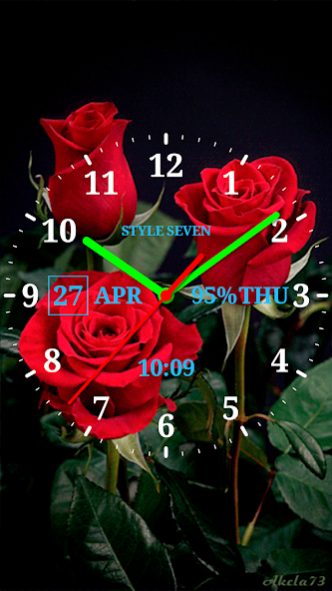
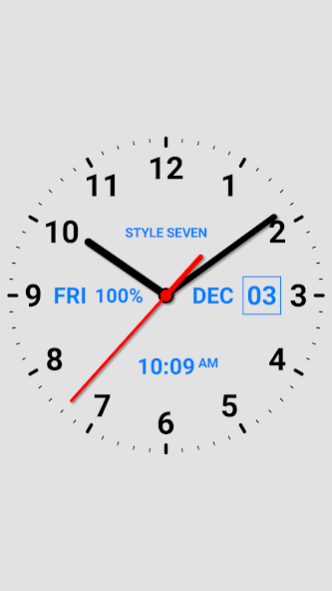

This is paid version of the app Analog Clock Live Wallpaper-7 since 2013.
This is transparent analog clock with a lot of settings. The analog clock shows also the current date, month, day of the week, battery charge, digital clock and can hint the current time with any text by schedule.
Features:
* App widget of analog clock with second hand and custom time zone for Android 12+;
* Set size and position on the Home screen for Live Wallpaper;
* Solid and gradient color style;
* Set custom logo text, for example your name;
* Set a background image;
* Speak the current time with additional text by schedule (max step is 15 minute, for example 6:00, 6:15 etc.);
* Set visibility and position for show the current time, date, day of the week, battery charge;
* Select primary and secondary color, color for text and background;
* Show digital clock and second hand.
Restrictions for app widget:
* Battery charge is not show;
* Gradient style is not supported.
Additional restrictions for app widget for Android 11 and low.
* White or black color themes are supported only;
* Second hand is not show;
* Time zone is not supported.
Additional features for paid version.
* Full control of colors;
* Use any image as background;
* Select background image;
* Show digital clock;
* Select a font;
* Set custom time zone;
* There is no advertisement;
* App size less at least by three times.
So this app is analog clock, analog clock widget, analog clock Live Wallpaper, talking clock, reminder, transparent analog clock, time zone analog clock.
About Analog Clock-7 PRO
The company that develops Analog Clock-7 PRO is StyleSeven.com. The latest version released by its developer is 5.6.
To install Analog Clock-7 PRO on your Android device, just click the green Continue To App button above to start the installation process. The app is listed on our website since 2023-08-07 and was downloaded 0 times. We have already checked if the download link is safe, however for your own protection we recommend that you scan the downloaded app with your antivirus. Your antivirus may detect the Analog Clock-7 PRO as malware as malware if the download link to com.style_7.analogclocklivewallpaper7pro is broken.
How to install Analog Clock-7 PRO on your Android device:
- Click on the Continue To App button on our website. This will redirect you to Google Play.
- Once the Analog Clock-7 PRO is shown in the Google Play listing of your Android device, you can start its download and installation. Tap on the Install button located below the search bar and to the right of the app icon.
- A pop-up window with the permissions required by Analog Clock-7 PRO will be shown. Click on Accept to continue the process.
- Analog Clock-7 PRO will be downloaded onto your device, displaying a progress. Once the download completes, the installation will start and you'll get a notification after the installation is finished.
Program Details
System requirements
Download information
Pricing
Version History
version 5.6
posted on 2023-08-07
* Fixed bug for option "keep screen on" (after restart the app).
* Fixed minor bugs.
* Some minor changes.
version 5.51
posted on 2023-06-22
Minor changes.
version 5.5
posted on 2023-06-13
Minor improvements of performance.
Fixed minor bugs for Live Wallpaper for some devices.
version 5.4
posted on 2023-05-25
Major changes for settings window.
Minor changes for app widget.
Other minor changes and improvements.
version 5.31
posted on 2023-05-07
Fixed bug for Live Wallpaper: one tap instead two taps for speak the current time.
version 5.1
posted on 2023-01-21
For Android 12+:
* Fixed bug for widget (set white or black color only). Now widget has the same colors as app (except gradient mode);
* Fixed bug for set a time zone and reset this option;
For all versions of Android:
* Fixed major bug for set custom time zone for app or Live Wallpaper.
version 4.6
posted on 2022-02-20
Widget for Android 12
* Show digital clock;
* Fixed bug for a custom time zone.
Standard widget (up to Android 11)
* Show digital clock.
This widget recommended for Android 8-11 and has some restrictions:
- can not show second hand, battery charge;
- color of hands can be white or dark;
- widget has fixed sizes only.
version 4.53
posted on 2022-01-20
Widget for Android 12: show the current date, day of the week and month.
New widget with second hand and custom time zone for Android 12.
Minor changes.
version 4.4
posted on 2021-12-06
* Standard widget (very stable);
* Help for resolve common problems;
* Fixed problem for Android 12 (Live Wallpaper);
* Minor changes.
version 4.34
posted on 2021-10-07
Minor changes and improvements.
Disclaimer
Official Google Play Link
We do not host Analog Clock-7 PRO on our servers. We did not scan it for viruses, adware, spyware or other type of malware. This app is hosted by Google and passed their terms and conditions to be listed there. We recommend caution when installing it.
The Google Play link for Analog Clock-7 PRO is provided to you by apps112.com without any warranties, representations or guarantees of any kind, so access it at your own risk.
If you have questions regarding this particular app contact the publisher directly. For questions about the functionalities of apps112.com contact us.
